

Interview Listing
The default Interviews tab shows every scheduled interview and assessment across all candidates in one sortable, filterable table.
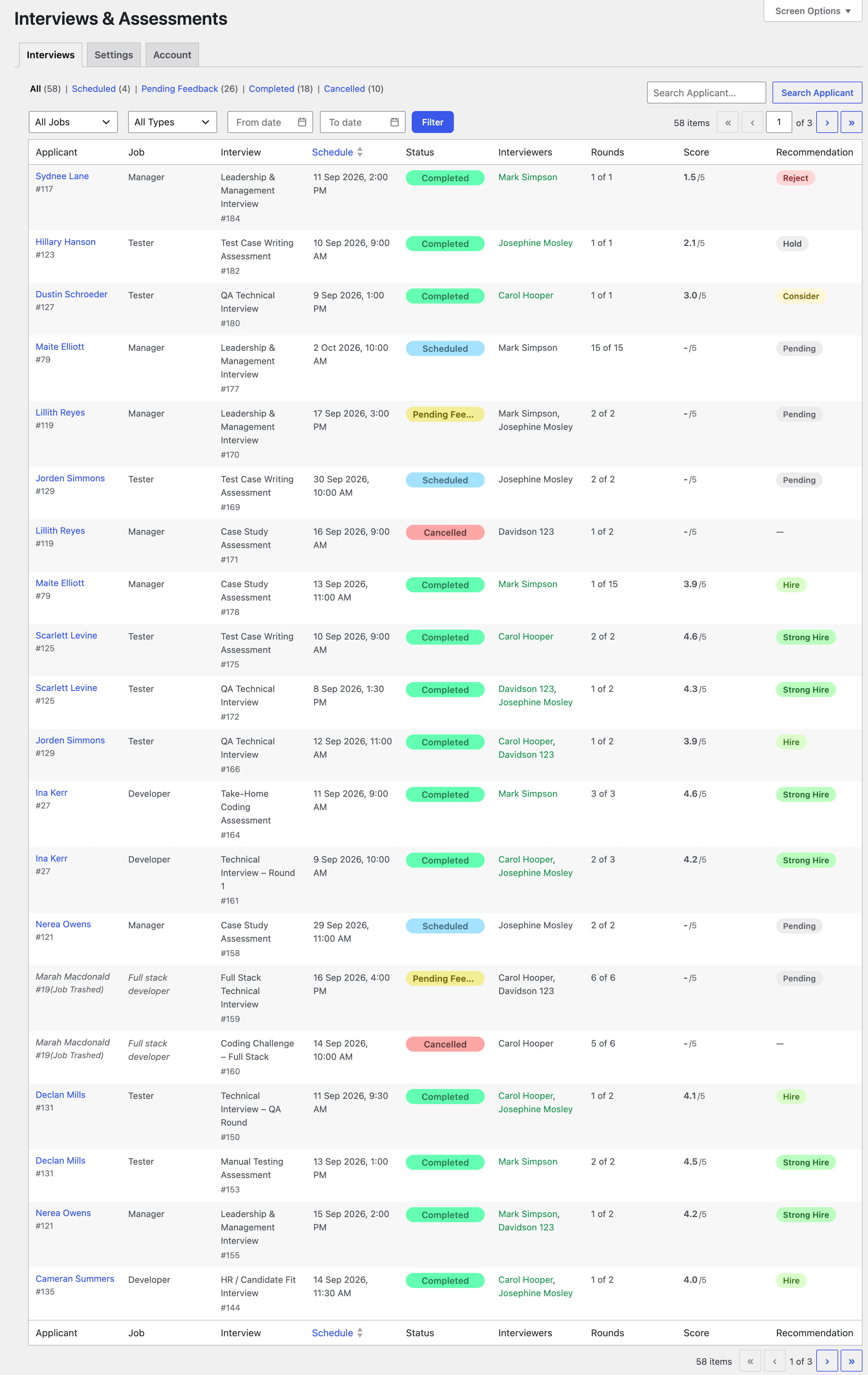
Status Tabs
- All: Every evaluation, regardless of status.
- Scheduled: Evaluations that haven't taken place yet.
- Pending Feedback: Evaluations that have occurred but are still waiting on one or more evaluators to submit their feedback.
- Completed: Evaluations where all assigned evaluators have submitted feedback.
- Cancelled: Evaluations that were cancelled.
Each tab shows a live count of matching evaluations, and respects whatever filters or search are currently applied.
Filters & Search
- Search applicants…: Searches by the candidate's name or email address.
- All Jobs: Filter to evaluations belonging to a specific job opening.
- All Types: Filter to just Interview or just Assessment.
- From date / To date: Filter by the evaluation's scheduled date.
- Filter: Applies the selected filters.
Columns
- Applicant: The candidate's name, linking to their application.
- Job: The job opening this application belongs to.
- Interview: The title of the evaluation.
- Schedule: The scheduled date and time. The only sortable column.
- Status: Scheduled, Pending Feedback, Completed, or Cancelled.
- Interviewers: The evaluators assigned to this evaluation.
- Rounds: The total number of interviews/assessments scheduled for this candidate overall — the same number appears on every row for that candidate, since it counts all their evaluations, not just this one.
- Score: The average overall rating (out of 5) across all feedback submitted for this evaluation, or "-/5" if no feedback has been rated yet.
- Recommendation: The most common recommendation among submitted feedback for this evaluation — Strong Hire, Hire, Consider, Hold, or Reject — or Pending if no feedback has been submitted.
Note: A Hiring Panelist sees this same table layout, but it's automatically scoped to only the evaluations they're assigned to, and the Score and Recommendation columns reflect only their own feedback (unless the Feedback Visibility setting allows them to see everyone's).
Was this page helpful?