

Pagination
Customize pagination controls in the Job Listings Beta block with border, radius, background, and text color settings.
Pagination settings
The Pagination Settings provide options to customize the appearance of the pagination controls used for navigating between job listing pages. You can configure styling properties such as Border and Border Radius to adjust the structure and visual presentation of the pagination elements.
Additionally, there are options to set the Background Color and Text Color, allowing you to align the pagination design with the overall look and branding of your website.
Border and structure
Use these settings to shape the pagination controls and define how prominent they appear within the Job Listings block.
-
Border — Adjusts the outline around each pagination element to make controls more defined or more minimal.
-
Border Radius — Rounds the corners of the pagination elements to create sharper or softer visual styling.
-
Padding — Adds internal spacing inside each pagination element to control the size and breathing room around the text or numbers.
Border and Border Radius work together. Use them to match the pagination controls to the button and card styles already used across your site.
Colors
Set colors that help the pagination controls feel consistent with the rest of your website.
-
Background Color — Changes the fill color of the pagination elements.
-
Text Color — Changes the color of the text or page numbers shown inside the pagination controls.
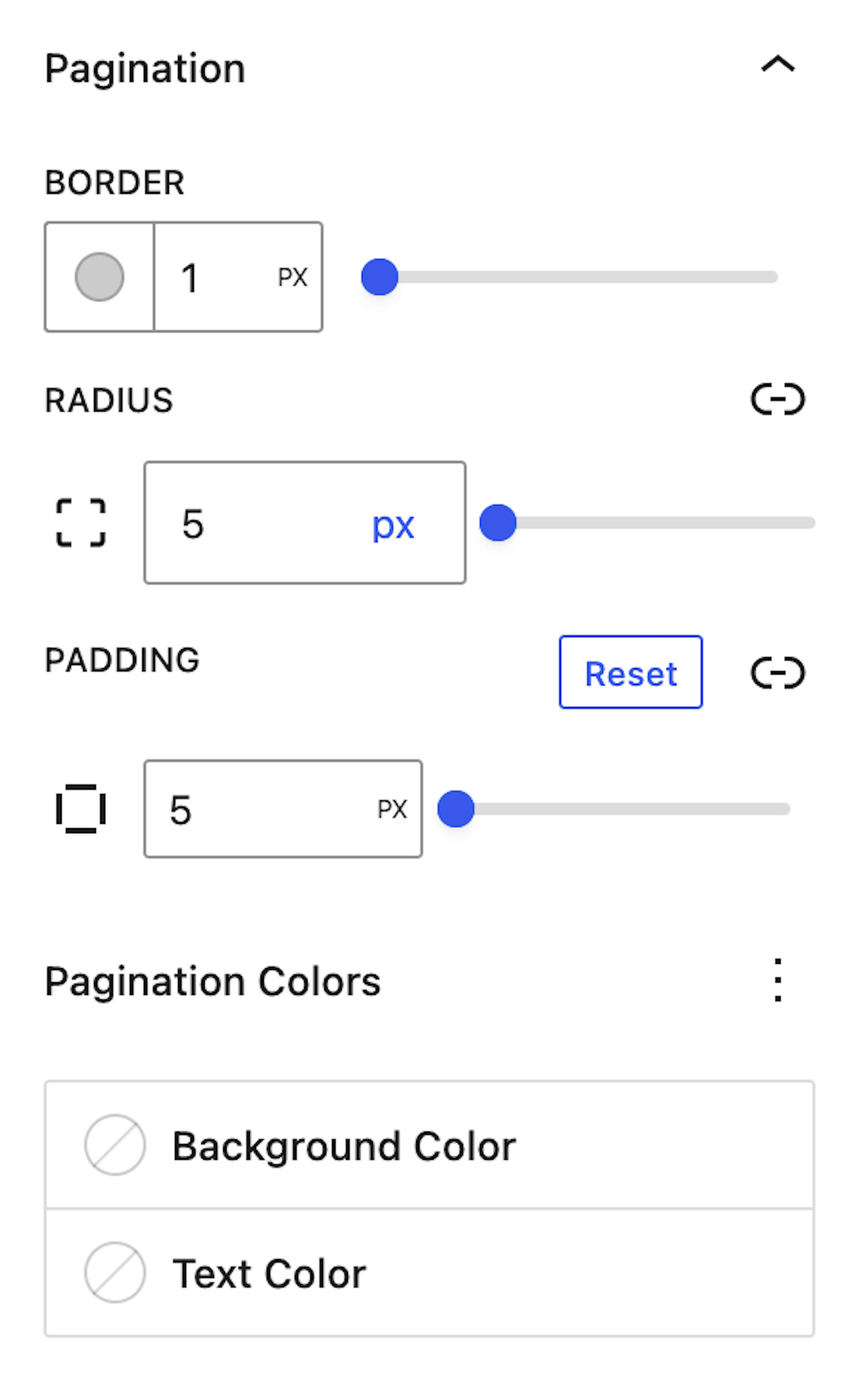
Image options
Choose background and text colors with enough contrast to keep page numbers easy to read.